
The single most common mistake in DIY faucet repair isn’t dropping a screw down the drain or stripping a handle. It’s buying the wrong replacement part. Cartridges aren’t universal — even within a brand. Buy a Delta RP19804 when you needed an RP46074 and your $25 fix doesn’t fix anything; you’re back at the hardware store, this time with the right part, frustrated.
So before you order a cartridge, before you head to Home Depot, before you start unscrewing anything — figure out what brand and model your faucet actually is. This guide walks you through how, in order from easiest to most laborious. The good news: most faucets installed in the last fifteen years have a model tag hidden under the sink. You just need to know where to look.
Method 1: Find the Original Documentation
The fastest path is the most boring one — paperwork.
If you bought the faucet yourself: check the box (basements, garages, and storage closets are full of “I’ll keep this just in case” boxes), the original receipt, or the installation manual. Anything that came with the faucet has the model number on it.
If the home was built or remodeled by someone else: check builder paperwork, home inspection reports, or any “fixtures and finishes” lists from the closing documents. Larger builders sometimes provide an appliance/fixture spec sheet.
This works maybe 30% of the time for current owners and almost never for inherited fixtures. When it doesn’t work, move to Method 2.
Method 2: Look Under the Sink for a Model Tag
Most modern faucets have a small label hidden somewhere under the sink. The location varies by brand. Here’s where to look:
Delta
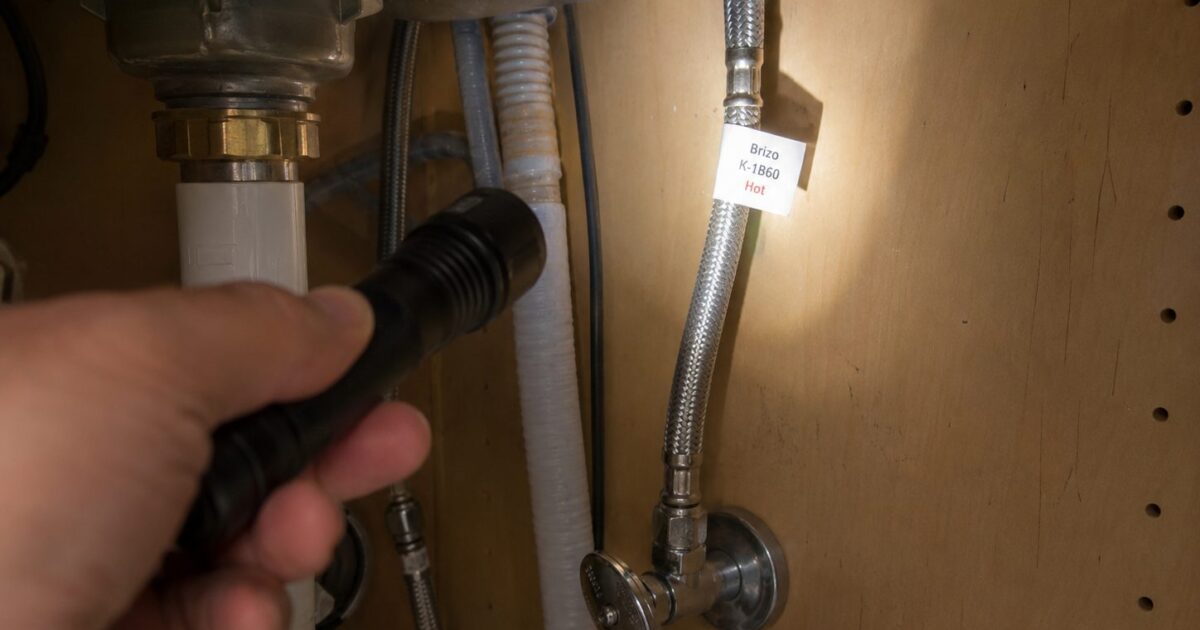
Most Delta faucets manufactured from roughly 2012 onward have a model identification tag attached to one of the flexible supply lines — typically the cold-water line. The tag is small, usually a paper or plastic label, and often marked “DO NOT REMOVE” in bold letters.
Get under the sink with a flashlight. Trace the supply lines (the braided steel hoses) up from the shut-off valves. The tag is usually within the first 6–12 inches of the hose. The model number on the tag — something like “9159T-AR-DST” — is everything you need to look up parts.
If your Delta is older than ~2012, there’s likely no supply-line tag. Move to Method 3 or 4.
Moen
Moen faucets are less consistent than Delta. A few places to check:
- Original packaging — Moen’s most reliable identifier (most accurate when you have it)
- Supply lines — some newer Moen single-handle models have a small tag, similar to Delta’s
- Faucet body — Moen often embosses a series number on the body itself. Common locations: the back of the spout, underneath the handle trim ring, or on the underside of the spout where it meets the deck. Use a flashlight and feel around with your fingers; the embossing is small.
Kohler
Kohler typically does NOT use supply-line tags. Instead, the model information is usually printed or stamped directly on the faucet body or valve.
Common spots: behind the spout (you may need to lift the spout slightly), underneath the handle (remove the handle if you have to — see [link to: faucet-repair-tools] for the tool), or sometimes on the bottom of the deck where the faucet body meets the sink. Look for a small “K-XXXXX” pattern stamped or printed.
If there’s nothing visible, Kohler’s customer service team is excellent — they’ll identify a faucet from a photo. More on that in Method 5.
Pfister
Pfister places a model label under the sink near the faucet shank (the part of the faucet that goes through the deck into the cabinet). Sometimes the label is on the supply line, sometimes on the shank itself. Look for a small Pfister logo with a model number underneath.
If no label is visible, Pfister’s “Ask a Question” support specifically invites photos — they’ll identify a faucet from a clear shot of the handle and spout.
Method 3: Use the Manufacturer’s Online Identifier Tool
If the under-sink tag hunt comes up empty, try the brand’s online tools:
- Delta — search for “Delta faucet identifier” or use Delta’s parts finder. Their support site lets you input partial info (handle style, finish, valve type) to narrow down the model.
- Moen — Moen’s “Solutions” site has a faucet identifier specifically designed for this. Input what you know (handle type, color, approximate age) and it’ll narrow to a few likely candidates.
- Kohler — Kohler’s parts catalog is searchable by faucet style and finish.
- Pfister — Pfister’s “Pforever” parts site lets you upload a photo, and their team often responds within 1–2 business days.
These tools work best when you can describe the faucet clearly. Take a few photos before you start (handle straight on, handle rotated, full faucet from the side, faucet from above) so you have reference shots.
Method 4: Identify by the Cartridge Itself
If you’ve gotten this far without an answer, the next step is to remove the cartridge and inspect it directly. You’ll need to do this anyway for the actual repair — and the cartridge often has its own identifying marks.
(Quick safety check: shut off the under-sink supply valves before disassembling anything. Open the faucet to confirm no water flow. See [link to: pillar1] for the full repair safety sequence.)
After removing the cartridge, look for:
Delta cartridges are typically plastic with a distinctive thick stem and a colored cap. The two most common Delta cartridges look very similar but differ in cap color: RP46074 has a gray top cap, RP19804 has a white top cap. The white-cap RP19804 also has a visible metal spring at the bottom; the gray-cap RP46074 has a flat brass bottom. If your cartridge has a stamped Delta logo or a part number in raised lettering, that’s your answer.
Moen cartridges are typically all plastic, white or off-white. The 1200 and 1225 cartridges are nearly identical visually — both white plastic cylinders with two flat tabs. The PosiTemp 1222 (used in shower valves only) often has a blue accent ring on top. The model number is sometimes embossed in small raised letters near the top edge.
Kohler cartridges are usually metal-bottomed (often brass) with a plastic stem on top — they look more substantial than Delta’s or Moen’s mostly-plastic units. Look for a stamped part number on the brass base.
Pfister cartridges vary by model series. Many Pfister cartridges are simple plastic units with no distinctive color cues. The model number is usually embossed somewhere on the body, but it may be small and hard to read without a flashlight.
If you’re still stuck after pulling the cartridge, take it to a hardware store with you. The plumbing department staff can often match it visually within a minute or two. Bring it dry and clean.
Method 5: Contact the Manufacturer Directly
If everything above fails, reach out to the manufacturer’s support team with photos. All four major brands have responsive support that can identify a faucet from clear photos.
What to send:
- A straight-on photo of the faucet handle (showing handle shape and any decorative caps)
- A photo of the spout from the side
- A photo of the underside of the faucet from below the sink
- The cartridge itself if you’ve removed it
Expect a response within 1–3 business days. Faster if you call during business hours.
This sounds like the slowest option but it’s actually quite efficient — you’ll often get the model number AND a recommendation for the right replacement part in a single response. And if your faucet is under warranty (Moen and Kohler both offer Limited Lifetime warranties for original homeowners — see the Pillar 1 hub [link to: pillar1] for details), they may ship you a replacement cartridge for free.
Quick Decision Tree
If you want this all in one place:
- Got the original box, manual, or receipt? Use the model number on it. Done.
- No paperwork? Look under the sink for a model tag. Delta: cold supply line. Moen: supply line or embossed body. Kohler: faucet body. Pfister: shank or supply line.
- No tag found? Try the manufacturer’s online identifier tool with photos.
- Online tool inconclusive? Remove the cartridge and inspect it directly.
- Still stuck? Send photos to the manufacturer’s support team. Wait 1–3 business days.
If you’ve made it through all five methods and still don’t have an answer, your faucet may be old enough or generic enough that exact identification isn’t possible — and that’s a sign you should consider replacing the whole faucet rather than chasing a part. See [link to: replace-kitchen-faucet] for that path.
What’s Next
Once you know your faucet brand and model:
- Delta: see [link to: delta-cartridge-identification] for which Delta cartridge fits which model
- Moen: see [link to: moen-cartridge-identification] for the 1200, 1222, and 1225 walkthrough
- Kohler: see [link to: kohler-cartridge-identification] for ceramic disc cartridge replacement
- Pfister: Pfister parts identification typically requires direct manufacturer support
Or if you’re ready to do the actual repair: see the Pillar 1 hub — Complete Guide to Faucet Repair [link to: pillar1] for the full step-by-step.
Sources
- Delta Faucet official documentation and parts identification guidance
- Moen Solutions faucet identifier and Part Identification guide
- Kohler product catalog and warranty documentation
- Pfister “Pforever” parts catalog and customer support guidance
- Trade resources including Family Handyman and This Old House for cross-brand identification methods
Educational content only. Not a substitute for licensed professional advice. Local plumbing codes vary by jurisdiction. Use of any guidance from this guide is at your own risk.
Get the homeowner’s plumbing repair toolkit checklist — the tools, parts, and decisions every homeowner should have on hand. [Free download — enter your email]