
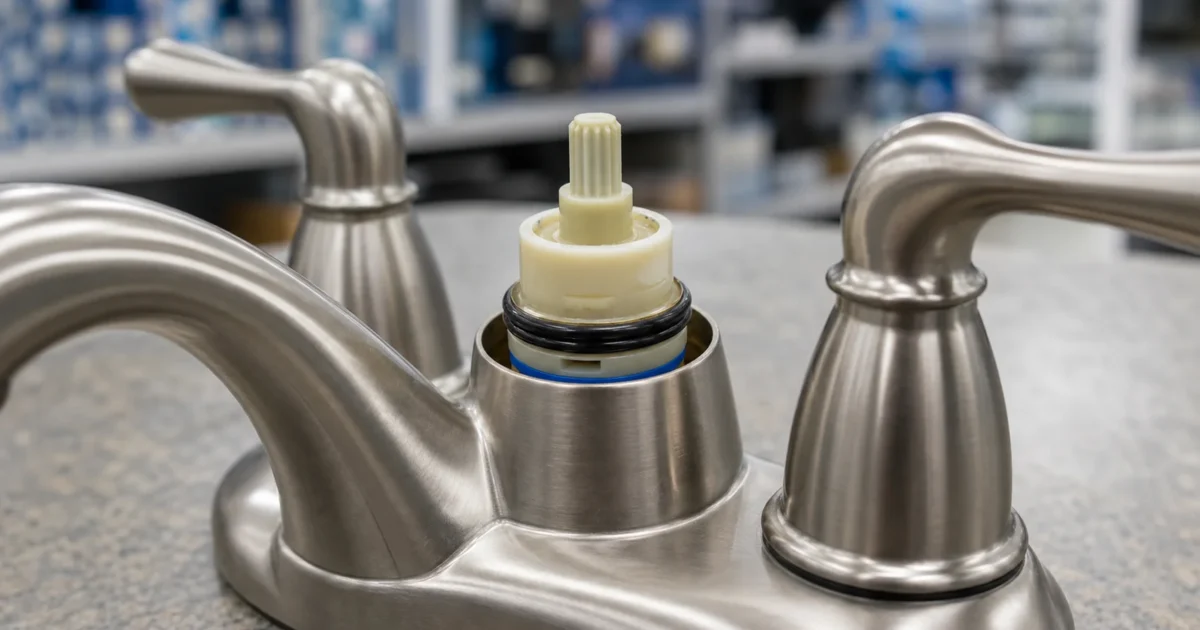
Moen Cartridge Identification: 1222, 1225B, 1200, or 1255? [2026]
Ordering the wrong Moen cartridge means a wasted hardware-store trip and — if you’ve already shut off the water — a house with no running faucet while you wait for the right part to arrive. Moen cartridge identification comes down to four methods: visible brand marks, hidden labels and under-trim clues, Moen’s own lookup tools, and — as a last resort — matching the cartridge shape itself. This article walks each method in order from least invasive to most hands-on, then gives you a decision tree so you can land on the right cartridge number before you buy.
Method 1: Check Visible Brand Marks First
The fastest path — no tools required — is to confirm the brand from the visible trim before assuming anything about the cartridge.
Moen, Delta, Kohler, Pfister, and American Standard all place logos on exposed parts. For sink and kitchen faucets, inspect the handle cap (the decorative disc on top), the front or back of the spout, the base ring, the deck plate, and the aerator face. The logo is often embossed or stamped — check in good light with a flashlight if the finish makes it hard to read.
For tub and shower systems, inspect the escutcheon face (the plate behind the handle), the handle cap, the tub spout, the shower arm flange, and the shower head. One important caution: don’t assume the shower head brand proves the valve brand. Shower heads are commonly replaced independently of the valve, so a Delta shower head may be covering a Moen rough-in valve. Identify the valve — not the shower head — before ordering any valve parts.
Once you confirm Moen trim, move to Method 3 to narrow down the cartridge model. If the logo is worn, missing, or ambiguous, Method 2 surfaces hidden evidence.
Method 2: Look Under the Sink and Behind the Trim
There’s a second layer of identification markings hidden from normal view — under the sink for faucets, and under the trim plate for shower valves.
Under-sink labels for faucets
Grab a flashlight and a phone camera and look under the sink. The most useful spots are the underside of the spout shank (the vertical tube through the deck), the mounting bracket or nut, any supply-line tag or pull-down hose tag, and labels stuck to the underside of the deck plate. On touch-activated or electronic faucets, check the control box as well.
Delta’s registration form asks for the product model number, serial number and purchase date. Photograph any label you find before it gets wet or the adhesive fails — a model number photographed today is a lookup completed tonight.
Under-trim markings for shower valves
For tub and shower systems, the model often can’t be read from visible trim alone. Home Depot’s faucet repair guide has you pull the handle free, then remove the faceplate behind it from the shower wall. With the trim off, photograph the valve body, retaining clip, stem shape, sleeve, and any stamped or cast letters on the brass.
One strong visual cue to look for once the trim is off — the handle motion pattern. A Moen Posi-Temp valve has a rotate-only shower handle, with no in/out pull and no volume control. If your shower handle only rotates and can’t be pulled forward or pushed back, you likely have a Posi-Temp valve, which takes the 1222 cartridge, but rule out M-CORE first (below): an M-CORE 2 Series handle also rotates only.
If the Moen valve is an M-CORE system, it does not take a 1222: Moen’s M-Core valve guide gives the 1212 for the 2 Series, whose handle rotates only, and the 1213 for the 3 Series, whose handle also tilts up and down for volume. For one multi-function configuration, the M-CORE U232CIS, Moen support lists a 1213 plus a 200758 diverter cartridge. Installing a 1222 in an M-CORE slot won’t seat correctly. The valve type must be confirmed before ordering.
Packaging, manuals, and purchase records
Don’t overlook paper records. Kohler and Delta both list packaging, literature, specification sheets, and receipts as valid model-identification sources. If your house came with a builder packet, an invoice from a renovation, or an online order history from Home Depot, the model number may already be there — searchable directly into any manufacturer’s parts tool.
Method 3: Use the Manufacturer’s Own Lookup Tool
Once you have a brand name or partial model number, each manufacturer maintains a parts lookup that turns a clue into a confirmed cartridge number.
Moen (moen.com/pages/support): Search for products, or snap a photo of the faucet and use the Moen Faucet Identifier to find the model number and replacement parts. If the model is unknown, use “Identify My Product.” Moen also exposes Faucet Finder, Cartridge Replacement, and Parts Finder links directly in support navigation. The tool works best when you can supply a model number, a clear fixture photo, or a visible cartridge family — it’s weaker when replacement trim has been installed over an older rough-in valve.
Delta (deltafaucet.com/service-parts/find-parts-and-identify-product): Enter the product model number if known, or use the category and issue tools — Delta’s parts tool includes issue flows for leaks, handles, hoses, tub/shower cartridges, and common parts. Delta’s registration form asks for the model number, serial number, purchase date and where you bought the product, so registration records are useful here.
Kohler (kohler.com/en/support/find-a-service-part): Identify the product, pull up the parts diagram for your model, and confirm the cartridge against the diagram illustration. Kohler also offers KOHLER Scout, a photo-upload identification tool, but Kohler labels it as beta — verify any Scout result against the official parts diagram before ordering.
Pfister (pfisterfaucets.com/parts-support/replacement-parts): Select a replacement category (cartridges, handles, hoses, spouts) or enter the model number. Pfister’s warranty workflow asks for model number, purchase date, proof of purchase, and problem description, so a model tag or receipt is the key input.
American Standard (americanstandard-us.com): Navigate the parts store by fixture type — its bathroom parts list splits into bathroom faucet, toilet, bathtub and shower system parts. American Standard product model numbers include finish suffixes such as 7426801.002 — the digits before and after the decimal both matter when matching trim to parts.
Method 4: Match the Cartridge Itself
If visible marks, hidden labels, and lookup tools all fail — or if you’ve inherited a faucet with no records — the old cartridge becomes its own evidence.
Home Depot’s faucet repair guide confirms that cartridges and stems come in many shapes and sizes, and that the old cartridge or stem can be taken to the store and matched with a reference guide when the model is unknown. For Moen specifically, the four main cartridge families are visually distinct:
- Moen 1200 — brass body; Moen sells it as a single-handle brass replacement cartridge
- Moen 1222 — Posi-Temp pressure-balanced shower cartridge, rotate-only valve
- Moen 1225B — single-handle replacement for leaks and drips, held in by a U-shaped copper clip
- Moen 1255 — Duralast single-handle cartridge, one of several Duralast kits whose retainer nuts are not interchangeable
To access the cartridge, remove the handle (typically one screw under the handle cap) and pull the cartridge with a cartridge puller or channel-lock pliers. Photograph the cartridge body, retaining clip shape, and stem before taking it anywhere or ordering online. Once you have a clear photo, use the free Repair Finder to match your cartridge to the correct Moen replacement before purchasing.
Moen Cartridge Identification: The Decision Tree
For Moen specifically, work from the valve type and the cartridge itself, not from the installation year alone:
-
Is this a shower-only valve with a rotate-only handle (no in/out pull, no volume control)? – Yes → Confirm Posi-Temp → Moen 1222 – Not sure → Continue
-
Is the valve an M-CORE system? – Yes → Not the 1222. Moen’s M-Core valve guide gives the 1212 for the 2 Series (the handle rotates only) and the 1213 for the 3 Series (the handle also tilts up and down for volume). Check your Moen M-CORE installation sheet. – No → Continue
-
Is this a single-handle kitchen or bath faucet? – Yes → Remove the handle and look at the cartridge and what holds it in
-
Which single-handle cartridge do you have? – A brass cartridge → compare it with the Moen 1200, which Moen sells as a single-handle brass replacement cartridge – Held in by a U-shaped copper clip → Moen 1225B – A Duralast cartridge held by a retainer nut → Moen 1255 or another Duralast kit; each kit has its own nut, and the nuts are not interchangeable (see the chart below) – Not sure → Pull the old cartridge and compare shape against the lineup image above, or take it to Home Depot for a visual match
-
Still unclear? – Use Moen’s “Identify My Product” at moen.com/customer-support, or call Moen support with any visible marks, handle behavior, or photos of the valve area.
For Delta shower valves with a single-handle MultiChoice Universal trim produced after March 2006, the most common cartridge is the RP46074 (Monitor 13/14 Series pressure-balanced cartridge). For Kohler, Pfister, and American Standard, the manufacturer’s parts diagram is the most reliable path — shape-matching alone is not sufficient for those brands.
Quick Reference: Moen and Major Brand Cartridge Cheat Sheet
| Brand / Valve | Best first clue | Cartridge | Lookup path |
|---|---|---|---|
| Moen Posi-Temp shower | Rotate-only handle, no volume control | 1222 | Moen shower cartridge guide |
| Moen single-handle, brass cartridge | Moen sells the 1200 as a single-handle brass replacement cartridge | 1200 | Moen 1200 product page |
| Moen single-handle kitchen or bath faucet, 1225 family (introduced 1981) | U-shaped copper retaining clip | 1225 | Moen’s kitchen and bathroom cartridge guides |
| Moen single-handle with a Duralast cartridge (introduced after 2009; dates vary by product category) | Retainer nut: each kit has its own nut style, and the nuts are not interchangeable | 1255, 160657, 150257 or 205013 | Moen’s kitchen and bathroom cartridge guides |
| Moen M-CORE | 2 Series: handle rotates only; 3 Series: also tilts for volume | 1212 (2 Series) or 1213 (3 Series) | Moen M-Core valve guide |
| Delta 13/14 Series (post-March 2006) | MultiChoice Universal trim | RP46074 | Delta parts finder |
| Kohler | Product stamp | Per Kohler parts diagram | Kohler service parts + Scout beta |
| Pfister | Category selection | Per Pfister parts page | Pfister replacement parts |
| American Standard | Model number with finish suffix | Per model page | americanstandard-us.com parts store |
Worked the decision tree above? Confirm the number stamped on your own cartridge before you buy — Moen's families look alike and do not substitute:
As an Amazon Associate, plumbingbythebook earns from qualifying purchases. Links below are affiliate links — they cost you nothing extra.
- Moen 1222 Posi-Temp Shower Cartridge
- Moen 1225B Single-Handle Replacement Cartridge
- Moen 1255 Duralast Cartridge
Not sure which part you have? The faucet & valve finder narrows it to the exact part in a few questions.
What’s Next After Identification
Once you’ve confirmed the cartridge number, the replacement itself is a manageable DIY job for most single-handle Moen faucets. For the 1225B, see How to Replace a Moen 1225 Cartridge for a step-by-step walkthrough including the retaining clip removal, cartridge orientation, and reassembly sequence.
If you’re still unsure whether your faucet is Moen at all, start with How to Identify Your Faucet Brand to confirm the brand before drilling down to the cartridge number. And if you want the full context on what goes wrong with a single-handle faucet, the Faucet Repair hub covers every problem type in the cluster.
If the cartridge is stuck, the retaining clip is corroded, or you have reason to think the valve body is damaged — that’s where a plumber earns their service fee before you risk a worse outcome.
When to Call a Plumber
Call a plumber when:
- The shower cartridge is stuck and won’t pull out with normal pressure — a stuck cartridge can crack the valve body if forced, turning a $25 repair into a full valve replacement
- The retaining clip is corroded and can’t be removed cleanly
- The valve body shows visible damage, pitting, or heavy scale deposits around the cartridge seat
- This is the only working bath in the house and you need a guaranteed same-day fix
- You’ve already bought two wrong cartridges and can’t confirm what you have
HomeAdvisor’s plumber cost data puts hourly rates at $45 to $200, service call fees at $100 to $250, and trip fees at $50 to $300. For a short identification call where a plumber confirms your valve type and either replaces the cartridge on the spot or gives you the correct part number, budget roughly $100 to $250 before parts — often less than the cost of repeated wrong cartridges and shipping delays. If the valve body itself is damaged or parts for an obsolete fixture are unavailable, HomeAdvisor puts faucet and fixture replacement at $150 to $600 depending on fixture type and local labor.
How do I know if my Moen shower valve uses a 1222 or a 1225B cartridge?
The 1222 is the Posi-Temp shower cartridge: a Posi-Temp handle only rotates, with no push-pull motion and no volume control. The 1225B is not only a sink cartridge, though: Moen also uses the 1225 in its standard and Moentrol single-handle shower valves, whose handle pulls out to turn the water on and set the volume, and rotates to set the temperature. So in a shower, a handle that only rotates points to the 1222 (rule out M-CORE first), and one that pulls out and rotates points to the 1225 family. The two cartridges are not interchangeable.
Can I install a 1225B in a Moen Posi-Temp shower valve?
No. The Moen 1222 is specifically designed for Posi-Temp pressure-balanced shower valves. A 1225B will not seat correctly in a shower valve that requires a 1222 and will not seal properly. Always match the cartridge to the valve type — not just the brand — before purchasing.
Where is the model number on a Moen faucet?
Common locations include the top of the handle cap, the face of the escutcheon, the spout base, and — for kitchen faucets — a label on the underside of the spout shank or deck plate. For shower valves, the model may be stamped on the valve body behind the trim, which requires removing the handle and escutcheon to access. If no model tag is visible, use Moen’s “Identify My Product” tool at moen.com/customer-support.
What if my Moen cartridge doesn’t look like the 1200, 1222, 1225B, or 1255?
Moen produces other cartridge models for specific product lines — the 1212 and 1213 for M-CORE valve systems (2 Series and 3 Series) are the most common examples. If the cartridge shape looks significantly different from the four main families, photograph it and contact Moen support before ordering. Do not order by appearance alone if you can’t confirm the model number; Moen support can identify the correct part from a clear photo of the cartridge and valve body.
Does Moen publish a serial number decoder so I can identify my cartridge from the serial?
Not publicly. Moen’s support page offers a product search and a photo-based Faucet Identifier for finding the model number, and no homeowner-facing serial-number decoding chart is published on the public support site. Serial numbers are primarily used to process warranty claims, not as a DIY cartridge identification tool. Your model number — or the visible valve behavior — is the reliable lookup input.
Is the Moen 1200 brass cartridge still available?
Yes. Home Depot lists the Moen 1200 brass single-handle replacement cartridge, as of October 2026. It remains a supported OEM part: Moen sells it as a single-handle brass replacement cartridge. Match it against the cartridge you pull rather than choosing it by the faucet’s age.
Sources
- Moen Customer Support — Identify My Product, Faucet Finder, Cartridge Replacement, Parts Finder
- Home Depot — Moen 1222 Posi-Temp Shower Cartridge (product page and Moen support Q&A)
- Home Depot — Moen 1225B Single-Handle Replacement Cartridge
- Home Depot — Moen 1200 Brass Single-Handle Cartridge
- Home Depot — Moen 1255 Duralast Cartridge
- Delta Find Parts and Identify Your Product
- Delta RP46074 MultiChoice Universal 13/14 Series Cartridge
- Delta Product Registration — model, SKU, serial, purchase date fields
- Kohler Service and Replacement Parts — Scout photo ID and parts diagrams
- Pfister Replacement Parts — category-based and model-number lookup
- American Standard Products and Parts Store
- Home Depot — How to Fix a Leaky Faucet (cartridge matching, shower disassembly)
- HomeAdvisor — How Much Does a Plumber Cost?
Educational content only. Not a substitute for licensed professional advice. Local plumbing codes vary by jurisdiction. Use of any guidance from this guide is at your own risk.
Parts for this repair
As an Amazon Associate, plumbingbythebook earns from qualifying purchases. Links below are affiliate links — they cost you nothing extra.
- Moen 1222 Posi-Temp Shower Cartridge — The OEM replacement for Moen Posi-Temp single-handle shower valves. A Posi-Temp handle only rotates, with no push-pull and no volume control.
- Moen 1225B Single-Handle Replacement Cartridge — Replacement cartridge for Moen single-handle kitchen and bath faucets where a U-shaped copper clip holds the cartridge in; Moen’s push-pull shower valves use the same cartridge family.
- Moen 1255 Duralast Cartridge — One of Moen’s Duralast single-handle cartridge kits. Each kit comes with its own retainer nut and the nuts are not interchangeable, so match the nut on your faucet before you buy. Brass body with PTFE seat rings.
- Moen 1200 Brass Single-Handle Cartridge — Moen’s brass single-handle replacement cartridge. Match it to the cartridge you pull before ordering.
Related guides
Store-Brand Faucet Cartridge: Finding the Part When the Brand Belongs to the Store
Your faucet drips, and the only name on it is Glacier Bay, Pegasus, AquaSource, Project Source or allen…
Frost-Free Outdoor Faucet Stem: How to Identify Yours Before You Order
Your outdoor faucet drips from the spout or the handle, and the repair parts aisle is full of…
Replacement Hose for Pull-Down Kitchen Faucet: How to Tell Which Fits
You have a pull-down kitchen faucet that won’t retract, drips under the sink, or has a cracked hose,…